rschneider82
New Member
- Messages
- 27
- Reaction score
- 2
I created a windows 11 iso to install on multiple laptops. But on the install of windows it is asking for drivers at the start. Looking over to see what I'm missing can find it.


You mean right on boot?I created a windows 11 iso to install on multiple laptops. But on the install of windows it is asking for drivers at the start. Looking over to see what I'm missing can find it.
That's fine. Only boot-critical drivers for storage controllers or devices, need to be included in both images.What if I have some drivers that I just in install and not boot.wim? Such as sound drivers, Bluetooth drivers and LAN drivers?
This totally helped me. Thanks! I'm new to this and just missed this step.Required drivers must be added into two places: boot.wim & install.wim
boot.wim allows the USB media to boot, run Setup, and find HW devices
install.wim is your Windows image
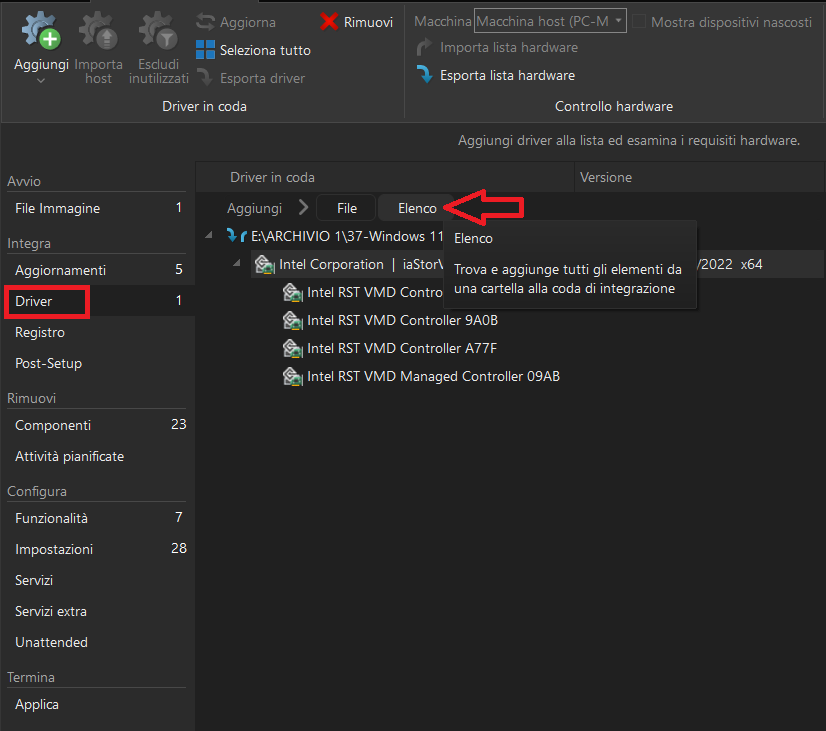
When you add a driver to the normal Windows image, in the Apply stage -- expand Reapply tasks across editions, and expand Integrate - Drivers. Check boot.wim (Windows Setup). All manually added drivers will be inserted into boot.wim at the same time.
View attachment 9271