Driver on Install

Unfortunately, I did not get the desired result for my situation.
I am forced to copy the “Intel Rapid Storage Technology Driver” drivers to USB stick and install them on the boot screen otherwise Windows does not see my partitions.
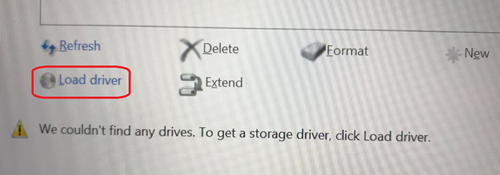
image.webp


I tried to insert them into the wim file but I don't get the desired result, maybe they should be inserted in a different boot section?
Thanks
 
And with these same drivers, does it work when you do "load driver" ?
Did you integrate into install.wim and boot.wim ?

You can test,

Mount install.wim,
Drivers page => Add => Directory containing drivers
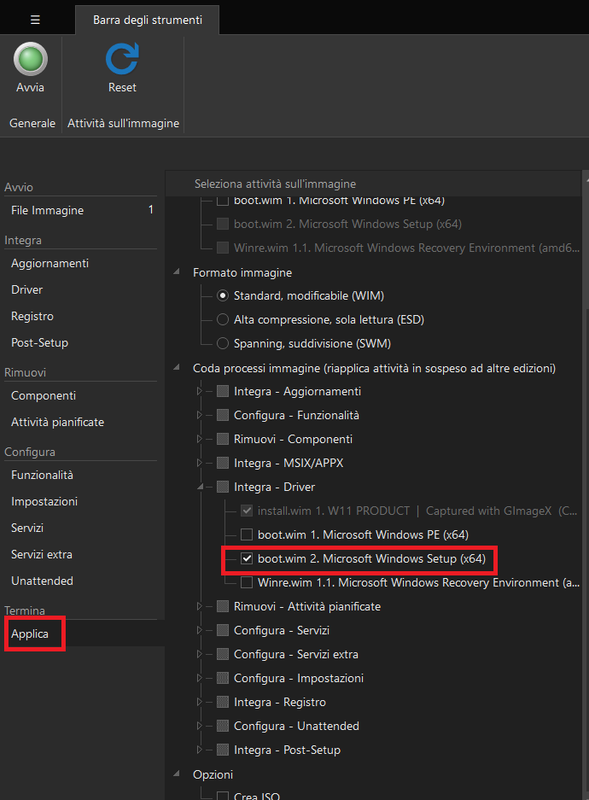
Apply page => expand Reapply tasks across editions => Integrate - Drivers
Add boot.wim 2. (Windows Setup)
 
The same drivers manually loaded , it works.
I only integrated the drivers into the wim file.
I did not also integrate them into the boot.wim file, maybe that is the problem.
 
Hi together.

Does anyone know if there is anything to pay attention to with the VirtIO drivers - especially the "vioscsi"?
I have integrated the entire driver package into Win11 Pro and additionally add the drivers into the boot.wim on:
  • Apply page
  • Reapply tasks across editions
  • Integrate - Drivers
  • added to boot.wim (Windows Setup).
But the (virtual) Windows 11 Setup can't find the virtual hard drive, so I have to add them again manually from the additional virtio-win-0.1.266.iso

Normally the function "reapply task across editions" works fine!

It may be important to mention that I have enabled all three component templates: "Privacy", "Gaming" and "Light".


EDIT - PROBLEM SOVLED
I've found my error. I used a preset with error: integrate "updates" instead of "drivers". I'm sorry for that.
 

Attachments

Last edited:
I am having this issue with the Intel Rapid Storage Driver. I have done it from the command line and NTLite. I added it to the install.wim and boot.wim and all items underneath the WIM files. I STILL do not get my controller under Windows setup, but I can take the same folder and manually load them. After saving them, if I open the WIM files and load the driver, it says it already exists.

ISO is Windows 11 24H2.

EDIT: Here is a screenshot of applying the drivers to all indexes.

View attachment 13448
 
Last edited:
Back
Top