
You are using an out of date browser. It may not display this or other websites correctly.
You should upgrade or use an alternative browser.
You should upgrade or use an alternative browser.
How can I remove Windows Backup App, SandBox?
- Thread starter Musaad
- Start date
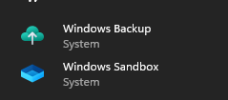
1. Windows Sandbox is currently not a removable component, but you can check if Sandbox is Enabled in Features.
2. Windows Backup App is part of the Client.CBS component; which can be removed, but is not recommended because Client.CBS is responsible for some desktop features.
You can hide its appearance in Start Menu if you disable MS Account logons. This only works if you don't use Xbox, Store, OneDrive or O365 online services.
Another option is to mount the install image and replace "\Windows\System32\IntegratedServicesRegionPolicySet.json" with a version that switches the "Backup options are restricted." default setting. This requires a fully updated W10 22H2 or W11 image to work.
Download PowerRun, and open a CMD window with TrustedInstaller rights. Now you will have the correct permissions to replace this file.
2. Windows Backup App is part of the Client.CBS component; which can be removed, but is not recommended because Client.CBS is responsible for some desktop features.
You can hide its appearance in Start Menu if you disable MS Account logons. This only works if you don't use Xbox, Store, OneDrive or O365 online services.
Code:
Windows Registry Editor Version 5.00

[HKEY_LOCAL_MACHINE\SOFTWARE\Policies\Microsoft\MicrosoftAccount]
"DisableUserAuth"=dword:00000001
Another option is to mount the install image and replace "\Windows\System32\IntegratedServicesRegionPolicySet.json" with a version that switches the "Backup options are restricted." default setting. This requires a fully updated W10 22H2 or W11 image to work.
Download PowerRun, and open a CMD window with TrustedInstaller rights. Now you will have the correct permissions to replace this file.
Attachments

- Messages
- 1,194
- Reaction score
- 234
This ? https://learn.microsoft.com/en-us/d...e-security-windows-defender-application-guard
If so, still have to have a use for it
If so, still have to have a use for it
- Messages
- 1,194
- Reaction score
- 234
Oh yeah, never used and not enabled by default (in Windows features)
To see for those who will use it while removing Sandbox, it will be possible to split the components
But there must not be many ?
EDIT : With 24h2 (not 23h2 on hand, to check), WDAG is not present in Windows features
Only "MD for Endpoint SenseClient" (On demand)
You're probably talking about something else
To see for those who will use it while removing Sandbox, it will be possible to split the components
But there must not be many ?
EDIT : With 24h2 (not 23h2 on hand, to check), WDAG is not present in Windows features
Only "MD for Endpoint SenseClient" (On demand)
You're probably talking about something else
Last edited:
Containers is one of two virtualization technologies available to Windows, and it's used by:
For previous Windows releases, this was broken out into separate components. But today, they're grouped together under Application Guard because WDAG is being deprecated.
You keep thinking it's easy to split components. There are natural boundaries for Windows components as released by MS. Sometimes nuhi will "carve out" a new component, which isn't an official one but an artificial division of an existing component. The problem is this can lead to future support issues by creating new problems with unexpected dependencies.
- Windows Sandbox
- Containers (for hosting Docker)
- WDAG for Edge browser
For previous Windows releases, this was broken out into separate components. But today, they're grouped together under Application Guard because WDAG is being deprecated.
You keep thinking it's easy to split components. There are natural boundaries for Windows components as released by MS. Sometimes nuhi will "carve out" a new component, which isn't an official one but an artificial division of an existing component. The problem is this can lead to future support issues by creating new problems with unexpected dependencies.
- Messages
- 1,194
- Reaction score
- 234
I don't think of anything at all for the separation of Containers and Sandox components, it's nuhi 
If you speak well of Containers - Application Guard (VBS), finally who uses this function more intended for Windows Server it would seem ?
Except in a pro field surely (Games template removes it, eg)
Yes, Containers and Sandbox are just one component and just Storage QoS is "grouped" with Containers
And I was just answering the question, to remove the components, for those who do not use these functions
If you speak well of Containers - Application Guard (VBS), finally who uses this function more intended for Windows Server it would seem ?
Except in a pro field surely (Games template removes it, eg)
Yes, Containers and Sandbox are just one component and just Storage QoS is "grouped" with Containers
And I was just answering the question, to remove the components, for those who do not use these functions
Thank you for your reply, So I don't use Xbox, Store, OneDrive, or O365 online services. in this case, i can completely remove the Windows backup?1. Windows Sandbox is currently not a removable component, but you can check if Sandbox is Enabled in Features.
2. Windows Backup App is part of the Client.CBS component; which can be removed, but is not recommended because Client.CBS is responsible for some desktop features.
You can hide its appearance in Start Menu if you disable MS Account logons. This only works if you don't use Xbox, Store, OneDrive or O365 online services.
Code:Windows Registry Editor Version 5.00 [HKEY_LOCAL_MACHINE\SOFTWARE\Policies\Microsoft\MicrosoftAccount] "DisableUserAuth"=dword:00000001
Another option is to mount the install image and replace "\Windows\System32\IntegratedServicesRegionPolicySet.json" with a version that switches the "Backup options are restricted." default setting. This requires a fully updated W10 22H2 or W11 image to work.
Download PowerRun, and open a CMD window with TrustedInstaller rights. Now you will have the correct permissions to replace this file.

- Messages
- 3,943
- Reaction score
- 1,648
As both said already, let me just summarize:
remove "Windows Feature Experience Pack - Desktop" for Backup
And "Containers" for Sandbox.
And yes, Backup shortcut in start menu is somehow hard-coded, could not get rid of it with usual methods, keeping an eye on it.
https://github.com/JamieToll/Remove_CBSStartMenuRubbish/blob/main/Remove_CBSStartMenuRubbish.ps1IF windows backup cant be removed, is there a way to kill the nags? it keeps spamming me to make a backup.
Here's the original thread introducing the script:
https://www.elevenforum.com/t/how-to-uninstall-new-windows-backup-bloat-app.15305/post-482459
Seems to work fine, assuming this package being removed is the backup app. I am just waiting a bit now, as I am testing what is making WU hide .net updates, but this will be in my post install script next test run.
Code:
C:\Extras>powershell.exe -File Remove_CBSStartMenuRubbish.ps1
Reading the Appx manifest file for 'MicrosoftWindows.Client.CBS_cw5n1h2txyewy'...
Changing package 'MicrosoftWindows.Client.CBS' version from '1000.26100.18.0' to '1000.26100.18.1'...
Hiding the Start menu item 'Get Started'...
Hiding the Start menu item 'Windows Back up'...
Creating a backup of the original Appx manifest file for 'MicrosoftWindows.Client.CBS_cw5n1h2txyewy'...
Setting 'Administrators' to have full control of 'C:\Windows\SystemApps\MicrosoftWindows.Client.CBS_cw5n1h2txyewy\appxmanifest.xml'...
Saving the updated Appx manifest file for 'MicrosoftWindows.Client.CBS_cw5n1h2txyewy'...
Getting details for package 'MicrosoftWindows.Client.CBS'...
Setting package 'MicrosoftWindows.Client.CBS_cw5n1h2txyewy' to deprovisioned...
Setting the End-of-life setting for package 'MicrosoftWindows.Client.CBS_1000.26100.18.0_x64__cw5n1h2txyewy'...
Removing package 'MicrosoftWindows.Client.CBS_1000.26100.18.0_x64__cw5n1h2txyewy' for all users...
Removing the End-of-life setting for package 'MicrosoftWindows.Client.CBS_1000.26100.18.0_x64__cw5n1h2txyewy'...
Removing the deprovisioned setting for package 'MicrosoftWindows.Client.CBS_cw5n1h2txyewy'...
Installing package 'MicrosoftWindows.Client.CBS' for all users...
Waiting a second...
Killing the process 'explorer.exe'...
Starting the process 'explorer.exe'...
Waiting for the process 'explorer' to start...
Resetting permissions on 'C:\Windows\SystemApps\MicrosoftWindows.Client.CBS_cw5n1h2txyewy\appxmanifest.xml'...You're not actually removing the Windows Backup app (and Get Started), but unregistering Client.CBS package from your user profile, and re-registering a modded AppxManifest.xml without it being referenced.
Removing files isn't an option because Appx packages are protected by the Blockmap's file hashes. So this little dance is required in order to allow future Monthly CU's to be applied.
Removing files isn't an option because Appx packages are protected by the Blockmap's file hashes. So this little dance is required in order to allow future Monthly CU's to be applied.