How to create a Unattended setup, except it let you choose the username?

barberouge

Member
Messages
34
Reaction score
3
Hi.

I would like to have assitance with my new ntlite project. My question is about windows 10, but it should be similare in win 11.
I used to be able to create a fully unattended setup except 2 steps : partition/Hard drive target installation and username choice.

I don't what I did different, but now it's seam broken. How could I fill the unattended section, but let the username blank ?

My first Idea is to enter a password, but no username, will this cause the setup to prompt during first install to choose user name ?

If not, what would be a solution ?

Thanks.
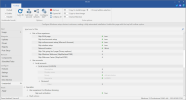
 
Unattended files can have as many, or as few, automated settings as you want. Anything that you don't provide in the file, Windows will force you to go through those install steps manually.

If your Unattended mode (or file) doesn't create a Local User and skip OOBE, you will be asked to create a primary user. Assuming you have the MS Account bypass enabled, by using NTLite's settings or alternative method, then you can have a Local Account.

One thing to note is Rufus has an optional Windows customization screen. When you use those options, Rufus creates its own unattend.xml file which can conflict with the normal autounattend.xml.
 
Unattended files can have as many, or as few, automated settings as you want. Anything that you don't provide in the file, Windows will force you to go through those install steps manually.

If your Unattended mode (or file) doesn't create a Local User and skip OOBE, you will be asked to create a primary user. Assuming you have the MS Account bypass enabled, by using NTLite's settings or alternative method, then you can have a Local Account.

One thing to note is Rufus has an optional Windows customization screen. When you use those options, Rufus creates its own unattend.xml file which can conflict with the normal autounattend.xml.
Thanks.

I did try, but I loaded a previous preset.

Now everything work, except I am unable to let the username blank. Should I choose append or overwite presets ? Or how can I used previous presets with new unattend setting ?
 
You can load the preset, and manually delete whatever Local account(s) you have in there. Highlight the top of the section with the account, and click on Remove from the toolbar.
 

Attachments

  • Capture1.PNG
    Capture1.PNG
    88.8 KB
  • Capture2.PNG
    Capture2.PNG
    93.3 KB
Back
Top