How to skip or disable the Windows Security dialog box when installing a device driver in Post-Setup?

xShARkx

Member
Messages
56
Reaction score
3
So I am trying to use the installer (attached below) for a pinpad device from the manufacturer itself in ntlite Post-Setup, the problem is that when I do that it will get stuck due to the Windows Security dialog box showing up asking for confirmation to install the driver, in other words, a screen like this:
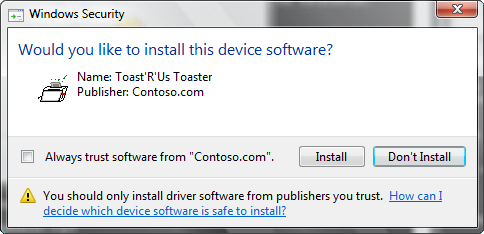
tutorialwindowssecurityinstalldialog.png


I am using the installer cause it also installs some certificates etc., instead of just extracting the device driver and using only it.

Manufacturer website to download the driver installer:


PS: it's the same file as attached below.
 

Attachments

Try to extract the file Gertec_Generic_Driver_Installer_3.0.0.1.exe use the 7-zip, and add the contents to the driver installation.
 
1. Run the driver installer on a test system.

2. Open Certificate Manager (certmgr.msc), and select each of the Trusted Publisher certificates. Export them to their own file.

1745780140892.png

3. Add / File / Before logon (Machine), each of the cert files.

4. Add two commands before calling the drivers installer:
Code:
certutil -addstore "TrustedPublisher" "%SYSTEMROOT%\Setup\GERTEC_CA2020.cer"
certutil -addstore "TrustedPublisher" "%SYSTEMROOT%\Setup\GERTEC_SHA256_G3.cer"

Normally for an embedded device, the manufacturer or vendor will provide you the same instructions (export the signing certs and apply them to Windows), before running the installer to avoid the "Trust this software" prompts.
 
1. Run the driver installer on a test system.

2. Open Certificate Manager (certmgr.msc), and select each of the Trusted Publisher certificates. Export them to their own file.

View attachment 14269

3. Add / File / Before logon (Machine), each of the cert files.

4. Add two commands before calling the drivers installer:
Code:
certutil -addstore "TrustedPublisher" "%SYSTEMROOT%\Setup\GERTEC_CA2020.cer"
certutil -addstore "TrustedPublisher" "%SYSTEMROOT%\Setup\GERTEC_SHA256_G3.cer"

Normally for an embedded device, the manufacturer or vendor will provide you the same instructions (export the signing certs and apply them to Windows), before running the installer to avoid the "Trust this software" prompts.
Is this correct?

NkAEWVQ.png
 
Looks fine to me.
Any idea why it's not working with the pro version of windows 10? I was using LTSC before, but i need to swtich to pro due to some issues i faced with LTSC with some machines that does not occur on PRO.

I am doing the same thing to the pro version that i did to the LSTC per your instructions just like the screenshot below:

aakD8Fz.png


But I am getting the windows security prompt when in post-setup and after logging into windows and checking the installed certificates, only one got imported:

mDtn5lG.png


I've re-done everything like 5 times already.
 
Again your presets don't match. Where are the imported certificates? There are two certutil commands, but no actual certs listed in the preset.
 
Again your presets don't match. Where are the imported certificates? There are two certutil commands, but no actual certs listed in the preset.
Because I've added them before, I just moved them in this preset to the right order, because every time I load the iso, the post setup is out of order from the order I left it when I clicked PROCESS, just like in this screenshot:

EPSCr1c.png


See, I just opened the ISO and it's out of order:

sJ3wwvH.gif


Ok here, I've removed and added them again, so they show up in the preset file:

mKkqSJm.png


Before clicking process, i always leave the post setup in this order:

aakD8Fz.png


But when i go back to the iso again, after processing it, its out of order.
 

Attachments

garlin It seems I fixed it, I set up one virtual machine with windows pro to export the certificates again, and now it's working :) Maybe the second certificate which was not getting imported, was having some incompatibility issues with windows pro since I was using LTSC before and i exported them from LTSC?
 
The cert enrollment steps are exactly the same for all Windows releases or editions.

What's happening is Post-Setup changes are being dropped from your preset, and you're missing some of the files.

As long as the listed files in Post-Setup are saved in their source folders, you should be able to re-use a preset on a different image. I know NTLite sometimes has bugs when you reload an image and it copies back the Post-Setup items from the image, instead of using the last saved preset for reference.
 
The cert enrollment steps are exactly the same for all Windows releases or editions.

What's happening is Post-Setup changes are being dropped from your preset, and you're missing some of the files.

As long as the listed files in Post-Setup are saved in their source folders, you should be able to re-use a preset on a different image. I know NTLite sometimes has bugs when you reload an image and it copies back the Post-Setup items from the image, instead of using the last saved preset for reference.
I still think it was the certificate itself, i re-did it many times and nothing work! Including doing a brand-new ISO and just trying to import the certificates in post-setup, but it did not work, it only worked after i exported them again from a windows pro machine instead of ltsc.
 
Last edited:
Back
Top