Windows 11 Pro multi-language

Just made the stick without the update and without NTLite by just using Rufus. It works perfect.

The second attempt I used NTLite and added the unpacked (7 ZIP) update to the updates tab. Then it says, while installing Windows, the installation failed.

When unzipping I do get this error: There are some data after the end of the payload data

When adding to NTLite i get these errors:

Unreadable or unsupported file: C:\Users\xxx\Desktop\ISO\windows11.0-kb5063878-x64_c2d51482402fd8fc112d2c022210dd7c3266896d(1)\DesktopDeployment_X86.cab

Unreadable or unsupported file: C:\Users\xxx\Desktop\ISO\windows11.0-kb5063878-x64_c2d51482402fd8fc112d2c022210dd7c3266896d(1)\DesktopDeployment.cab

Unreadable or unsupported file: C:\Users\xxx\Desktop\ISO\windows11.0-kb5063878-x64_c2d51482402fd8fc112d2c022210dd7c3266896d(1)\onepackage.AggregatedMetadata.cab

Unreadable or unsupported file: C:\Users\xxx\Desktop\ISO\windows11.0-kb5063878-x64_c2d51482402fd8fc112d2c022210dd7c3266896d(1)\wsusscan.cab

I used the link u gave me: https://catalog.sf.dl.delivery.mp.m..._c2d51482402fd8fc112d2c022210dd7c3266896d.msu

I then save the image as ESD and create an ISO, which I then copy to the USB stick with Rufus.

Will try again tomorrow.
 
Last edited:
The second attempt I used NTLite and added the unpacked (7 ZIP) ISO to the updates tab. Then it says, while installing Windows, the installation failed.
I don't understand, do you want to add the ISO to the NTLite updates page ?

So, open NTLite, from the Image page, click Add => Image directory (or Image (ISO...) if it's an ISO), and indicate the path of your image (directory) extracted with 7zip
And you'll see this (for me) :

Capture.PNG

Then double-click on Windows 11 Pro (in my case) to load the image.
On the Updates page, add the .msu update with Add => File button (July update on the screen) :

Capture2.PNG

Then, in the Apply page, Process button

PS : If your image is not at least 26100.1742 (info in the NTLite status bar at the bottom), you will also need to integrate the KB5043080 update
 
You can't save this project as a WIM. As part of the normal process, NTLite has to create \sources\lang.ini with a list of installed languages.

This file must be inserted in two places to work: both boot.wim and the ISO folder. If you apply the extra Language Packs as Updates, they are correctly integrated into the image. What's missing is the copies of lang.ini which inform Setup that you have extra languages.

When Applying changes, have NTLite create the ISO instead.
Excuse me i didnt understand it well do you mean i need to mount boot.wim apply the desired language from update section and the same process for windows edition.wim then create the ISO?
 
No. There are parallel sets of Language Packs for install.wim (Windows) and boot.wim (WinPE). You only need extra language support in WinPE if the user who is installing Windows, needs to run boot.wim in a different language.

When NTLite integrates LP's into install.wim, it will create a lang.ini file on the ISO to offer you a choice of different languages. But the Setup program itself is not internationalized. For example, if the install.wim has Norwegian then you have the choice to install Windows in Norwegian.

This doesn't give the Setup client the ability to ask you to partition the disk in Norwegian. For that, you would have to add separate Optional Components to boot.wim to get Setup to run in different languages.

You can run Setup in a single language, but install Windows in different languages.
You can run Setup in different languages, but install a single Windows language.
You can run Setup in different languages, and install Windows in different languages.

Most users want the first option. So all you need is to add LP's to install.wim and leave boot.wim alone.
 
No. There are parallel sets of Language Packs for install.wim (Windows) and boot.wim (WinPE). You only need extra language support in WinPE if the user who is installing Windows, needs to run boot.wim in a different language.

When NTLite integrates LP's into install.wim, it will create a lang.ini file on the ISO to offer you a choice of different languages. But the Setup program itself is not internationalized. For example, if the install.wim has Norwegian then you have the choice to install Windows in Norwegian.

This doesn't give the Setup client the ability to ask you to partition the disk in Norwegian. For that, you would have to add separate Optional Components to boot.wim to get Setup to run in different languages.

You can run Setup in a single language, but install Windows in different languages.
You can run Setup in different languages, but install a single Windows language.
You can run Setup in different languages, and install Windows in different languages.

Most users want the first option. So all you need is to add LP's to install.wim and leave boot.wim alone.
Thank you i managed to do it, i started with french lang pack but still one thing.. some of the titles are not translated all the settings are still in english plus some glitches windows update does not show correctly.
 
The correct order for updating 24H2/25H2 images:

1. Load the base image.
2. Add the LP's, apply changes.
3. Reload the updated image.
4. Add the Checkpoint CU (KB5043080)
5. Add the current Monthly Update CU, apply changes.

Prior to 24H2/25H2, there was no Checkpoint CU to add. This is a new requirement in order for LP integration to correctly work.
 
因为有些客户需求,要使用多国语言的win11 24H2 ,这些天我一直在看微软官方文档。使用DISM添加语言,各种包都加完了,然后安装过程也很顺利。但是在安装界面开始就是默认英文和我添加的简体中文混杂在一起。也不知道到底是哪里出了问题。因此我还专门下载了26200.6584.250915-1905.25h2_ge_release_svc_refresh_CLIENT_CONSUMER_x64FRE_en-us 的ISO文件。本地化文件Microsoft.LanguageExperiencePackzh-CN_26100.122.196.0_neutral__8wekyb3d8bbwe.Appx 。装完系统后,始终都是混杂语言。
---- 翻译 ----
Because some customers require the use of multiple languages for Win11 24H2, I have been reading Microsoft's official documentation these days. Using DISM to add languages, all the packages were added and the installation process went smoothly. But from the beginning of the installation interface, the default English and the simplified Chinese I added were mixed together. I don't know exactly where the problem lies. Therefore, I also specifically downloaded the ISO file 26200.6584.250915-1905.25h2_ge_lease_svc_fresh_CIENT-COSUMER-x64FRE-en-us. Localized files Microsoft.LanguageExperiencePackzh-CN_26100.122.196.0_neutral__8wekyb3d8bbwe.Appx 。 After installing the system, there is always mixed language.
 
我用NTLite添加包也试过,效果一样。
--翻译---Translation--
I have also tried adding packages with NTLite, and the effect is the same.
 
Because some customers require the use of multiple languages for Win11 24H2, I have been reading Microsoft's official documentation these days. Using DISM to add languages, all the packages were added and the installation process went smoothly. But from the beginning of the installation interface, the default English and the simplified Chinese I added were mixed together. I don't know exactly where the problem lies. Therefore, I also specifically downloaded the ISO file 26200.6584.250915-1905.25h2_ge_lease_svc_fresh_CIENT-COSUMER-x64FRE-en-us. Localized files Microsoft.LanguageExperiencePackzh-CN_26100.122.196.0_neutral__8wekyb3d8bbwe.Appx 。 After installing the system, there is always mixed language.
There are three different types of Windows language files:
- Language Packs
- Language Experience Packs (later replaced by Language Interface Packs)​

Language Packs have the most coverage of translated Windows text, but must be integrated to an image before any Cumulative Updates. If applied in the wrong order, translated text may be incorrectly displayed. If you add LP's to an already updated image, you must re-apply the same CU to the image again.

Language Experience Packs (LXP) and Language Interface Packs (LIP) try to solve this integration problem by moving the resources from a Windows update package to an UWP package. UWP packages can be removed and installed separately from the Windows image. This is very flexible, but the drawback is translated text is not as complete as the Language Pack.
 
There are three different types of Windows language files:
- Language Packs
- Language Experience PacksLanguage Interface Packs)​

Language Packs have the most coverage of translated Windows text, but must be integrated to an image before any Cumulative Updates. If applied in the wrong order, translated text may be incorrectly displayed. If you add LP's to an already updated image, you must re-apply the same CU to the image again.

Language Experience Packs (LXP) and Language Interface Packs (LIP) try to solve this integration problem by moving the resources from a Windows update package to an UWP package. UWP packages can be removed and installed separately from the Windows image. This is very flexible, but the drawback is translated text is not as complete as the Language Pack.
感谢解惑。
那意思是,添加了ISO文件26100.1.240331-1435.ge_release_amd64fre_CLIENT_LOF_PACKAGES_OEM中的所有语言界面包后,然后更新,再对应的添加所有语言体验包。
--翻译--
Thank you for clarifying.

That is, after adding all the language interface packages in ISO file 26100.1.240331-1435.ge-release_amd64fre_CIENT_LOF-PACKAGEs_OEM, then update and add all the corresponding experience language packages.
 
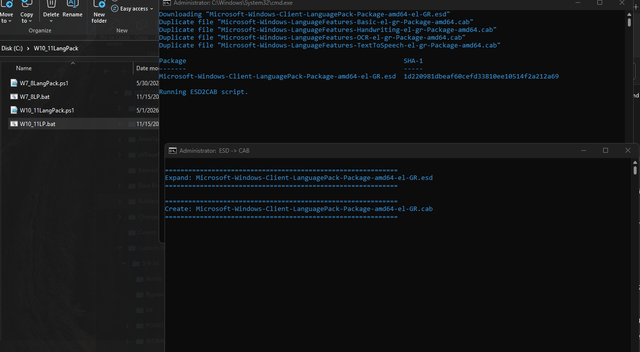
I don't understand your message. You downloaded languages files using uup.rg-adguard.net, did you convert the ESD to CAB first?
 
上面的错误是我用 uup脚本下载系统时,选择不更新,不装APP,38种语言全选。
--翻译-
The error above is that when I downloaded the system using UUP script, I chose not to update, not to install the apps, and selected all 38 languages.
 
Back
Top