if i know microsoft they won't fix it. and amd will share fixed driver for it.
thats what they did with dx12 support on autodesk products. they were broken and autodesk published an update
Almost every theme have some problems. Microsoft likes to change just ONE character in every dll to make sure nothing will work as you expect. I found a Goos XP theme for 8.1 but you need to disable dwm for custom window frame.
gota royale theme on 7 cos aero n basic suck monkey balls. 8.1 and 10 metros with prairie wind bmp are good enough.
and you can keep your start menu replacements. all you need is a few well placed shortcuts.
only thing i cannot live without is 7 Taskbar Tweaker.
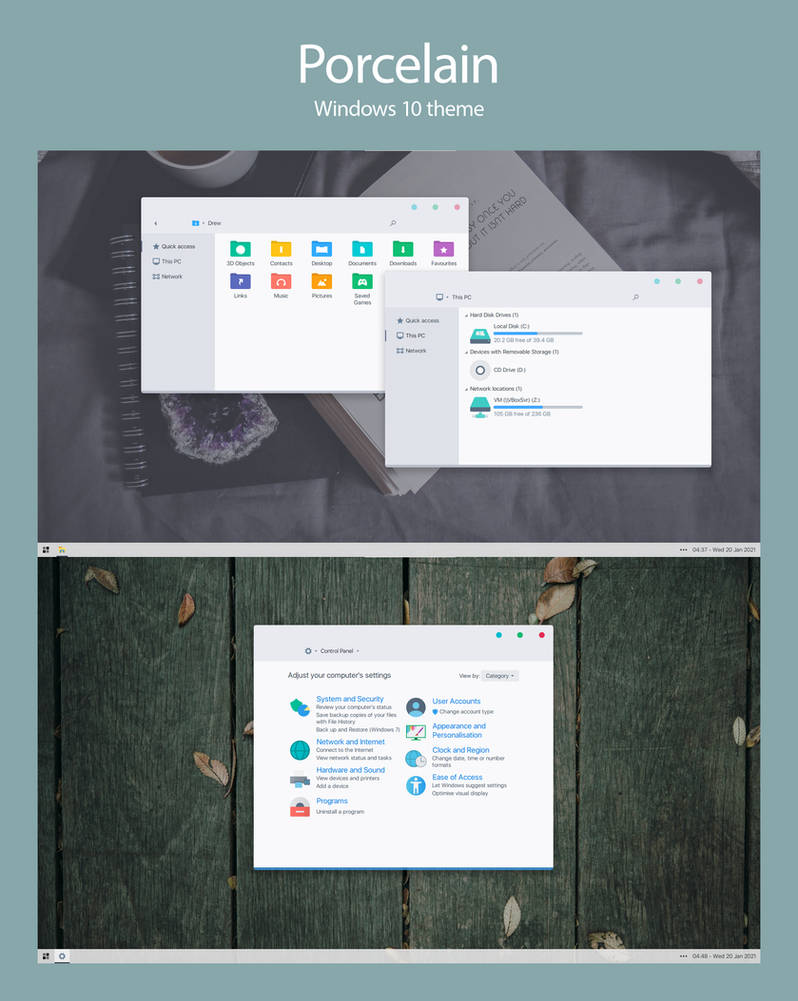
Theme for Windows 10. Supported builds: 1703, 1709, 1803, 1809, 1903, 1909, 2004 and 2009(20H2).
To determine what build you're on, run 'winver' from the start menu.
How to:
1.Create a system restore point!!! In case your system gets messed up you can restore it.
What is it? OldNewExplorer is the Windows 10 (and Windows 8.1, and 8) shell extension / tweaker which can undo "improvements" to file browsing made in newer Windows version. Everything is optional for your liking. - Restore devices / drives grouping Everything is 'Devices and drives'. That's stup...
msfn.org
(See image 01 for configuration)
6.Use Alt + Shift + P and Alt + P to toggle the details pane and preview pane respectively
Note:
If the theme is not applied after patching, the patcher may have failed to patch your system. Uninstall it and take ownership of the following files in C:\Windows\System32
uxtheme.dll, UXInit.dll and themeui.dll.
You may use this: https://www.howtogeek.com/howto/win...ership-to-explorer-right-click-menu-in-vista/
Install the patcher again, note status of the files (see image 02).
Apply the default Windows theme and uninstall patcher before updating to major Windows 10 update e.g updating from 1809 to 1903.
it uses "7TSP GUI 2019 Edition" for icon installation
I used it for win10 but i don't think i will use it for win11 even if its supported. don't want to modify system anymore. startallback is more than enough. yes ofc it can be all automated i can do it in 15 mins probably. but don't need it...
Theme for Windows 10. Supported builds: 1703, 1709, 1803, 1809, 1903, 1909, 2004 and 2009(20H2).
To determine what build you're on, run 'winver' from the start menu.
How to:
1.Create a system restore point!!! In case your system gets messed up you can restore it.
What is it? OldNewExplorer is the Windows 10 (and Windows 8.1, and 8) shell extension / tweaker which can undo "improvements" to file browsing made in newer Windows version. Everything is optional for your liking. - Restore devices / drives grouping Everything is 'Devices and drives'. That's stup...
msfn.org
(See image 01 for configuration)
6.Use Alt + Shift + P and Alt + P to toggle the details pane and preview pane respectively
Note:
If the theme is not applied after patching, the patcher may have failed to patch your system. Uninstall it and take ownership of the following files in C:\Windows\System32
uxtheme.dll, UXInit.dll and themeui.dll.
You may use this: https://www.howtogeek.com/howto/win...ership-to-explorer-right-click-menu-in-vista/
Install the patcher again, note status of the files (see image 02).
Apply the default Windows theme and uninstall patcher before updating to major Windows 10 update e.g updating from 1809 to 1903.
it uses "7TSP GUI 2019 Edition" for icon installation
I used it for win10 but i don't think i will use it for win11 even if its supported. don't want to modify system anymore. startallback is more than enough. yes ofc it can be all automated i can do it in 15 mins probably. but don't need it...
Thank you for the answer. I never heard about "blank it". Looks clean.
I ask about the auto script couse im still working on the normie 8.1 iso.
Want to integrate it to the iso.
This site uses cookies to help personalise content, tailor your experience and to keep you logged in if you register.
By continuing to use this site, you are consenting to our use of cookies.