Windows 11 Language Pack questions

jazzyjeff

New Member
Messages
2
Reaction score
0
Morning

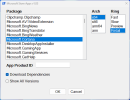
Not sure if this is an NTLite issue (I have emailed support also). I am getting an error as below when loading language files in

Seems like a version issue? Logs show

15/10/2025 09:30:51 Integrating: Language Pack | English - en-GB 10.0.26100.1 -> Windows 11 WindowsPE 24H2 x64 - 10.0.26100.1 (en-US) - Package is not applicable to this image.

This error can also indicate that a checkpoint/baseline update is missing, review NTLite's online update list for suggestions or contact support.

I am using the 25H2 Win 11 image (SW_DVD9_Win_Pro_11_25H2_64BIT_English_Pro_Ent_EDU_N_MLF_X24-13075)

1760518593678.png
 
When you integrate a LP, you must also reintegrate the checkpoint (KB5043080).
This is a new requirement with the 24h2 and the appearance of the checkpoint.

There was roughly the same thing with Windows 8.1 (but not really a checkpoint).
 
When you integrate a LP, you must also reintegrate the checkpoint (KB5043080).
This is a new requirement with the 24h2 and the appearance of the checkpoint.

There was roughly the same thing with Windows 8.1 (but not really a checkpoint).
Thank you tistou77, I grabbing that update from the MS catalog has cleared the warning at least

I've suggested to support that the warning message could be a little clearer to suggest that is what is needed, or could even auto add that update in to the list.

Building the image now, so will see how that goes. Thanks very much
 
Thank you tistou77, I grabbing that update from the MS catalog has cleared the warning at least

I've suggested to support that the warning message could be a little clearer to suggest that is what is needed, or could even auto add that update in to the list.

Building the image now, so will see how that goes. Thanks very much
You're welcome.
It's true that replacing Depend with Missing would probably be more understandable.
The uninitiated might think that the checkpoint is already integrated and there's no need to add it again.
 
When you integrate a LP, you must also reintegrate the checkpoint (KB5043080).
This is a new requirement with the 24h2 and the appearance of the checkpoint.

There was roughly the same thing with Windows 8.1 (but not really a checkpoint).
Thanks! tistou77:cool:
 
Is it only for me, that the "Please Wait" stage between "Installing devices" and "OOBE" takes a long time? Is it because I added 3 languages?
 
Is it only for me, that the "Please Wait" stage between "Installing devices" and "OOBE" takes a long time? Is it because I added 3 languages?
Probably not. Unless you have Dynamic Update installed.
One way to tell is to disable the network until right before OOBE begins. Does the install run any faster?
 
So, I have integrated languages.
I have imported Windows default apps .cab files from:
26100.1.240331-1435.ge_release_amd64fre_CLIENT_LOF_PACKAGES_OEM.ISO
I even downloaded .cab files from WEB.

Whatever I do, I cannot get the default apps to be the same as Windows language. Only when I update Windows.
What else do I need to do to make default apps the same language as the Windows language out-of-the-box?

Thanks.

What I have done:

- Install language packs + default apps (ISO + WEB) + KB5043080 > Not working
- Install language packs + default apps (ISO) + KB5043080 > Not working
- Install language packs + default apps (WEB) + KB5043080 > Not working
- Install language packs + KB5043080 > Then install default apps (ISO + WEB) + KB5043080 > Not working
- Install language packs + KB5043080 > Then install default apps (ISO) + KB5043080 > Not working
- Install language packs + KB5043080 > Then install default apps (WEB) + KB5043080 > Not working
 
Last edited:
Where can I download them?
Or are they in inbox apps ISO? I did not see them in different languages. Are they included into one bundle?
 
You can here


Or here (with ID, etc...)

 
MS has strict rules that MSIX and APPX bundles must be internationalized, so it's always the same download or install for everyone. This is probably one of the reasons why it's a less popular release format. If you're writing a tiny Store app, you still have to get it translated.
 
Yeah, after 2 weeks of struggling, it seems a better idea to have a separate ISO for each language.
Thanks everyone for helping. :)
 
Yeah, after 2 weeks of struggling, it seems a better idea to have a separate ISO for each language.
Thanks everyone for helping. :)
You're not the only one failing. In my case only some parts of of the system get localized. Coming from W10, where language pack integration worked perfectly fine, now i can't make it work in W11. The Online download via settings app downloads a newer version that i can't get otherwise, for example 26100.6584. ISO (26100.1.240331-1435.ge_release_amd64fre_CLIENT_LOF_PACKAGES_OEM.iso) has 26100.1. Have tried to re-integrate checkpoint, also no go.
 
Back
Top